If you work with coding agents long enough, you end up with a folder full of PLAN.md, TODO.md, PHASE_2_PLAN_v3.md. I did. The agent writes a plan, starts working, the context fills up, the session compacts, and the next session either ignores the plan or writes a new one.
The worse symptom is quieter. After a couple of compactions, the agent forgets the earlier phases of the plan and happily tells you the project is done. It isn’t. Half the work is still sitting in a markdown file nobody reads anymore.
Beads fixes that. It’s an issue tracker, but built for agents first and humans second. This post covers what it is, how to set it up, and the part that made me adopt it: tracking work across several repos, with tasks in one project blocked by tasks in another.
What Beads is
Beads is a CLI called bd. You run bd init in a repo, and it creates a .beads/ folder holding a small database of issues. Your agent creates issues, claims them, links them, and closes them with plain shell commands.
A few design choices make it different from GitHub Issues or Jira:
- It lives in the repo. No web app, no API token. The agent already has a shell, so it already has access.
- It’s a graph, not a list. Issues have dependencies.
bd readyreturns only the work that has no open blockers. That single command is what the agent asks at the start of every session. - IDs don’t collide. Issues get hash based IDs like
bd-a1b2instead of#5, so two agents on two branches can create issues at the same time without a merge fight. - Old work gets compacted. Closed issues can be summarized so they stop eating the context window.
The storage changed over time. The first versions wrote issues as JSONL in git with a SQLite cache and a background daemon. Current versions run on Dolt, a SQL database with git style versioning, embedded by default. The JSONL file is still exported, but it’s no longer the source of truth. A lot of setup advice you’ll find online predates that switch, so check the version.
It’s open source (MIT), written in Go, and lives at github.com/gastownhall/beads.
Getting started
Install it:
brew install beads
# or
npm install -g @beads/bd
Then in your project:
cd ~/code/my-app
bd init
You run bd init once. After that, the agent does most of the work. You just need to tell it Beads exists. Add a line like this to your CLAUDE.md or AGENTS.md:
Use `bd` for task tracking. Run `bd prime` at the start of a session,
`bd ready` to find work, and file an issue for anything you discover
but don't fix right now.
bd prime prints a short workflow guide made for agents, plus any memories stored with bd remember. It’s the quickest way to get the agent up to speed without pasting docs into the prompt.
The commands you’ll see your agent run the most:
bd create "Add rate limiting to the API" -p 1   # priority 1
bd ready                                        # unblocked work
bd update bd-a1b2 --claim                       # I'm on it
bd show bd-a1b2                                 # details + dependencies
bd dep add bd-c3d4 bd-a1b2                      # c3d4 depends on a1b2
bd close bd-a1b2
Watch the order in bd dep add: the first issue is the one that waits, the second is the blocker. I got this backwards the first time.
If you already have a pile of TODO files, the migration is one prompt: “move everything in TODO.md into beads issues, with dependencies”. The agent parses it and builds the graph.
Seeing the board
Beads has no UI of its own, on purpose. But since the data is local and open, the community built plenty. I use beads-ui:
npm i -g beads-ui
bdui start --open
It opens a local web page with a board split into Blocked, Ready, In progress and Closed, an epics view with progress, and live updates as the agent works. Watching issues move across the columns while Claude Code runs in the terminal is honestly the best way to see what the agent is doing without reading every line of output.
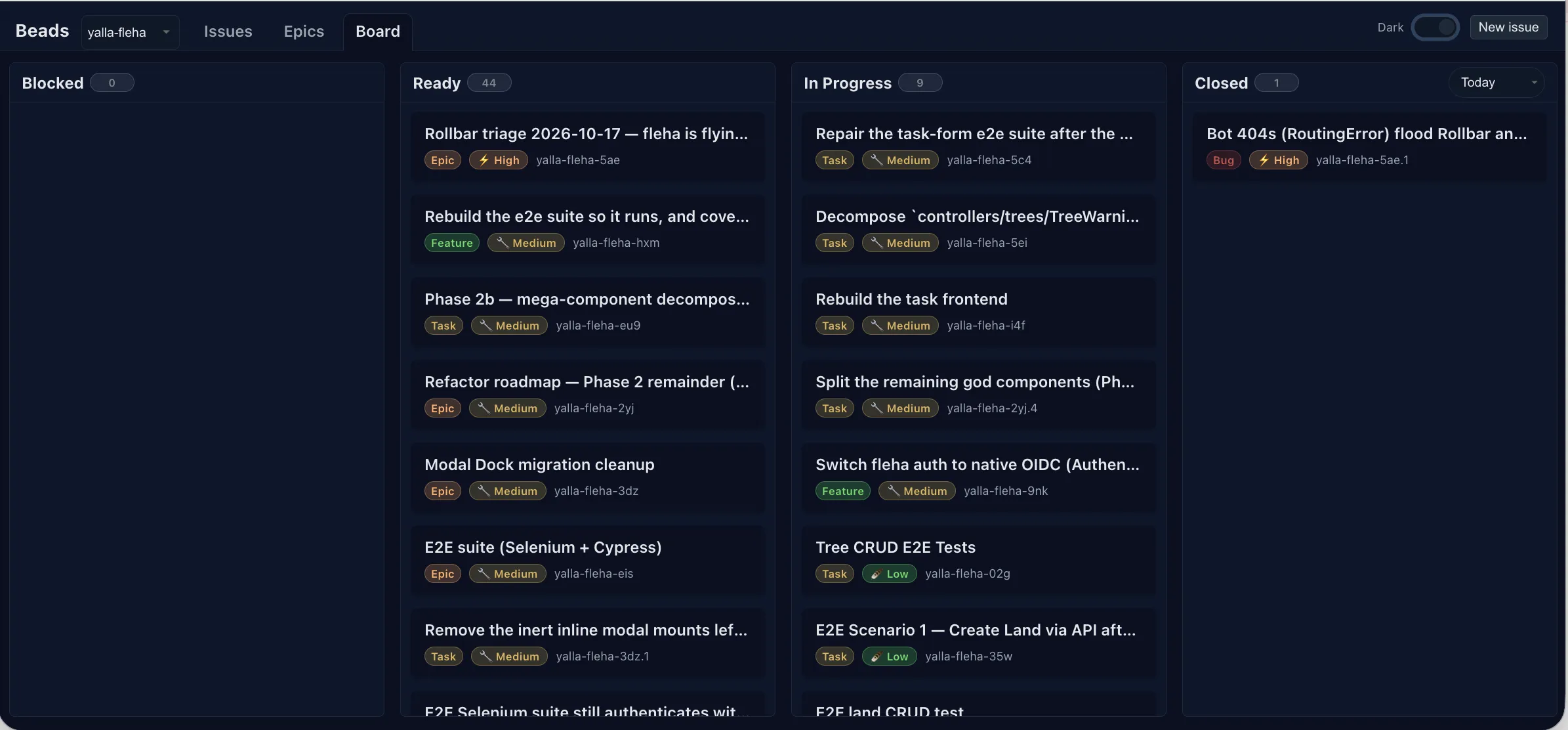
If you prefer the terminal, there are TUIs too (b9s, perles, LazyBeads), and even a kanban extension for VS Code.
Multi repo: one view, several projects
This is the part I care about most. My projects aren’t isolated. I have an auth service that several of my SaaS apps rely on. When I want a feature in an app, half the time it needs something in the auth service first. A per repo TODO file can’t express that.
Beads handles this with hydration: a repo can pull the issues of other repos into its own view. Each repo keeps its own database and prefix, and you pick one place where everything comes together.
Give each repo a distinct prefix when you initialize it, so you can tell issues apart at a glance:
cd ~/code/auth
bd init --prefix auth

cd ~/code/app
bd init --prefix app
Then, from the app repo, add the auth repo as an additional source and sync:
cd ~/code/app
bd repo add ../auth
bd repo sync
bd repo list
bd repo sync reads the other repo’s exported issues and imports them with their original prefix, tagged with where they came from. From now on bd list and bd ready in app show issues from both projects.
To sync across machines, it’s a separate concern: Beads uses Dolt remotes, so you run bd dolt push and bd dolt pull, the same way you push code.
A task blocked by another repo
Here’s the concrete case. In the auth service, I need a new endpoint:
cd ~/code/auth
bd create "Expose /oauth/google endpoint" -p 1
# → auth-k2m9
In the app, I want a “Sign in with Google” button, which is useless until that endpoint exists:
cd ~/code/app
bd create "Add Sign in with Google button" -p 1
# → app-r7t4

bd repo sync
bd dep add app-r7t4 auth-k2m9
Now app-r7t4 depends on auth-k2m9. When an agent in the app repo runs bd ready, the button task doesn’t show up. It sits in Blocked on the board, and bd show app-r7t4 tells the agent exactly why.
That’s the whole point. Without this, the agent picks up the button, can’t find the endpoint, and either stubs something fake or starts editing a repo it shouldn’t touch. With it, the agent works on something else.
When the auth side ships:
cd ~/code/auth
bd close auth-k2m9 --reason "Endpoint live on staging"

cd ~/code/app
bd repo sync
bd ready
# → app-r7t4 is now ready
One thing to remember: the app only sees the new state after bd repo sync. I added it to the instructions in CLAUDE.md so the agent syncs before asking for ready work.
There’s also a looser form, external:<project>:<capability>, for when you depend on a capability of another project rather than a specific issue. I haven’t needed it yet, the plain issue to issue link covers my cases.
Other setups that work the same way:
- Planning repo for open source. Your notes and tasks go to a private repo (
~/.beads-planning), so your PRs upstream contain only code.bd init --contributorsets it up. - Shared plus personal. Team issues in the shared repo, experiments in a personal one, both visible together.
- Phases. Separate repos for planning, implementation and maintenance, aggregated in the implementation one.
The honest part
Beads is not magic.
Agents don’t use it on their own. If it’s not in your CLAUDE.md, the agent won’t think of it. Even with the instruction, you’ll sometimes need to remind it to file the bug it just found instead of mentioning it in passing.
It’s young and moves fast. Run bd doctor from time to time, it catches and fixes most setup problems, and upgrade regularly. Older versions with the background daemon could fail to sync without saying anything, and issues would quietly go missing. The Dolt backend is much calmer, but I still glance at the board after a sync.
Keep the database small. Clean up closed issues regularly and stay under a few hundred open ones. Agents sometimes read the whole export file, and past a certain size it stops fitting in context.
And for a single session task, you don’t need it. Claude Code’s built in tasks are enough. My rule: will I need this context in two weeks? If yes, Beads. If not, don’t bother.
None of this is a dealbreaker. These are small habits to pick up, not reasons to skip it.
A game changer
I’ve tried a lot of tools around coding agents. Most of them are nice for a week and then I forget they exist. Beads is the first one that changed how I work every day.
Before, every session started with me explaining what was done, what was left, and what not to touch. Now I open the terminal, the agent runs bd ready, and it knows. It picks up exactly where the last session stopped, even if that was three days and two compactions ago. When it finds a bug on the way, it files it instead of forgetting it. And it no longer starts work that depends on something in another repo that isn’t finished.
That last part is what sold me. My projects depend on each other, and for the first time my agents can see those links instead of guessing.
The agent stopped being a smart assistant with no memory and started behaving like a teammate who knows the backlog. For me, that’s the biggest step forward since I started using coding agents.